Last updated: 26 Nov 2026
Query Tempo
Ruby apps emit traces through OpenTelemetry via the govuk_app_config. Grafana Tempo ingests these traces and stores them in S3.
Access Tempo
Tempo allows us to query these traces by writing TraceQL queries.
- Select explore in Grafana
- In the drop-down menu select Tempo
- In Query Type select TraceQL
Write a TraceQL query
TraceQL documentation provides examples on how to write queries.
{ }
Select Run Query and it will return all the traces. If you click on a traceID it will show you the spans inside it:
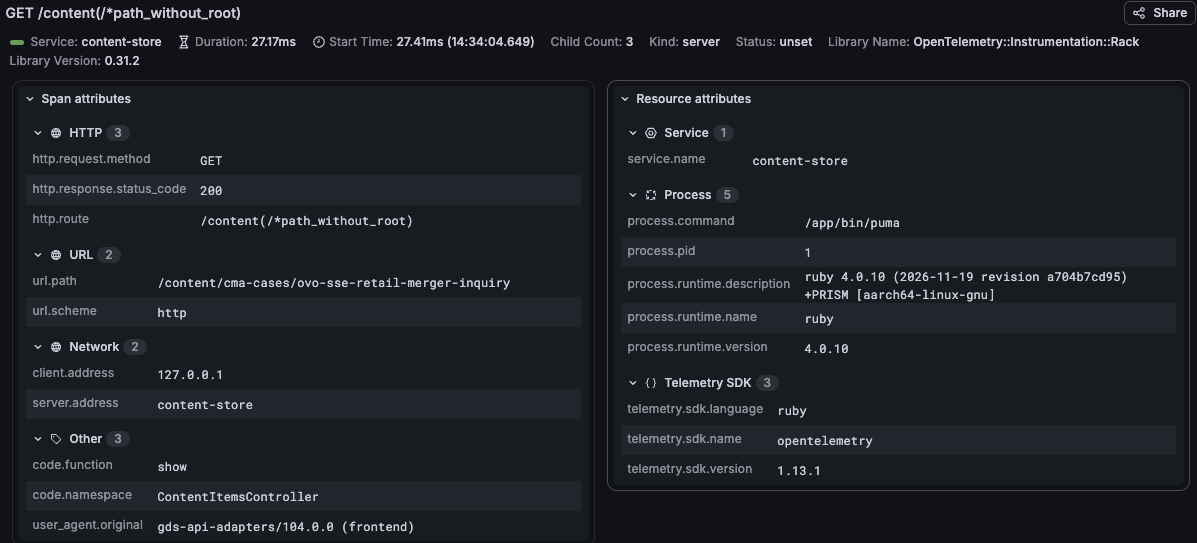
To see all the available span attributes to query on type in { span. and a drop-down menu will appear. To see all the available resource
attributes to query on type in { resource. and a drop-down menu will appear.
Retrieve traces for a specific govuk-request-id
{span.http.request.header.govuk_request_id ="2143"}
Retrieve traces where the service return a 200 status code
{ span.http.response.status_code = 200 }
Retrieve traces which contain a database query
{ span.db.statement != "" }
Retrieve traces from a particular service
{ resource.service.name = "asset-manager"}