govuk-ai-accelerator: Runbook: Ontology Generation Process
This guide provides a comprehensive runbook for the ontology generation process. It is split into two sections:
- User Guide (Non-Technical) - For Information Architects, Domain Experts, and Content Designers using the web interface.
- Technical & Developer Reference - For software developers, platform engineers, and developers maintaining the pipeline code and infrastructure.
Part 1: User Guide (Non-Technical)
What is Ontology Generation?
Once a domain has been created and its GOV.UK pages have been ingested (cleaned and downloaded), you can generate a seed ontology.
An ontology is a structured model of the concepts, relationships, and attributes that define a domain. The Ontology Generator uses Large Language Models (LLMs) to automatically read the ingested pages, identify important concepts, map their relationships, and format them into standard semantic web data.
How to Generate an Ontology (UI Workflow)
Follow these steps to configure and trigger an ontology generation run:
Step 1: Open the Application
Navigate to the Create Ontology page in your web browser: Link: https://govuk-ai-accelerator-app.integration.publishing.service.gov.uk/ontology/create
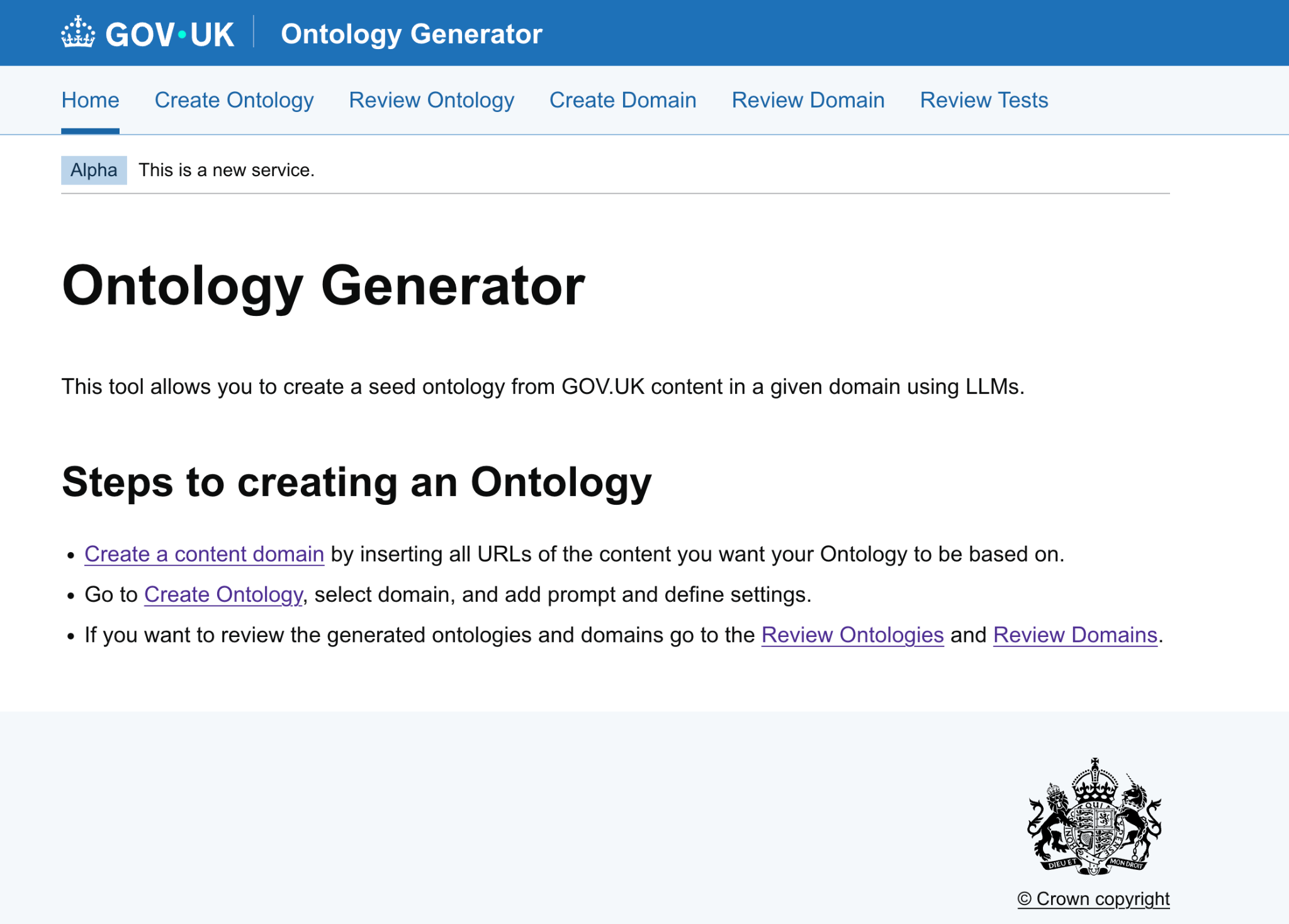
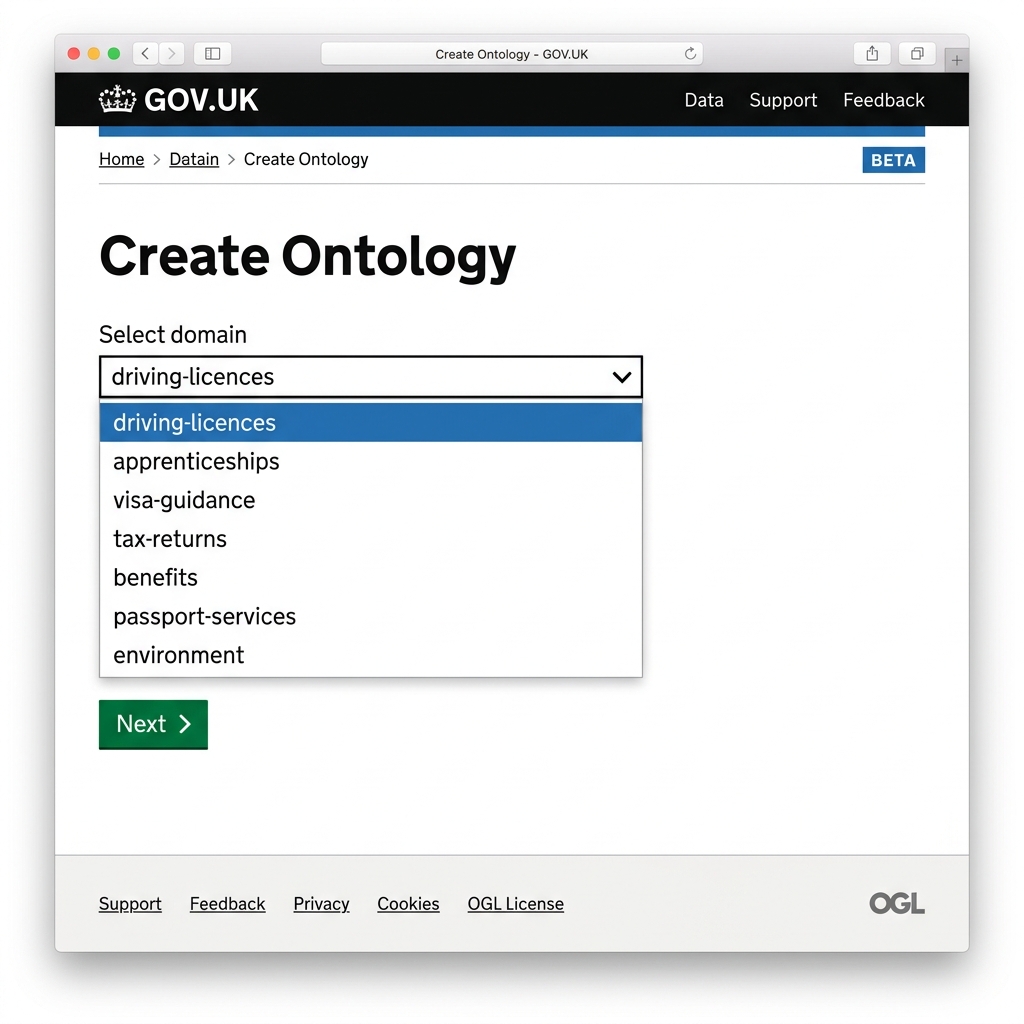
Step 2: Choose Your Domain
Select the domain you want to process from the dropdown list.
- Only domains that have already been created and ingested successfully will appear in this list. If you do not see your domain, complete the domain ingestion process first.
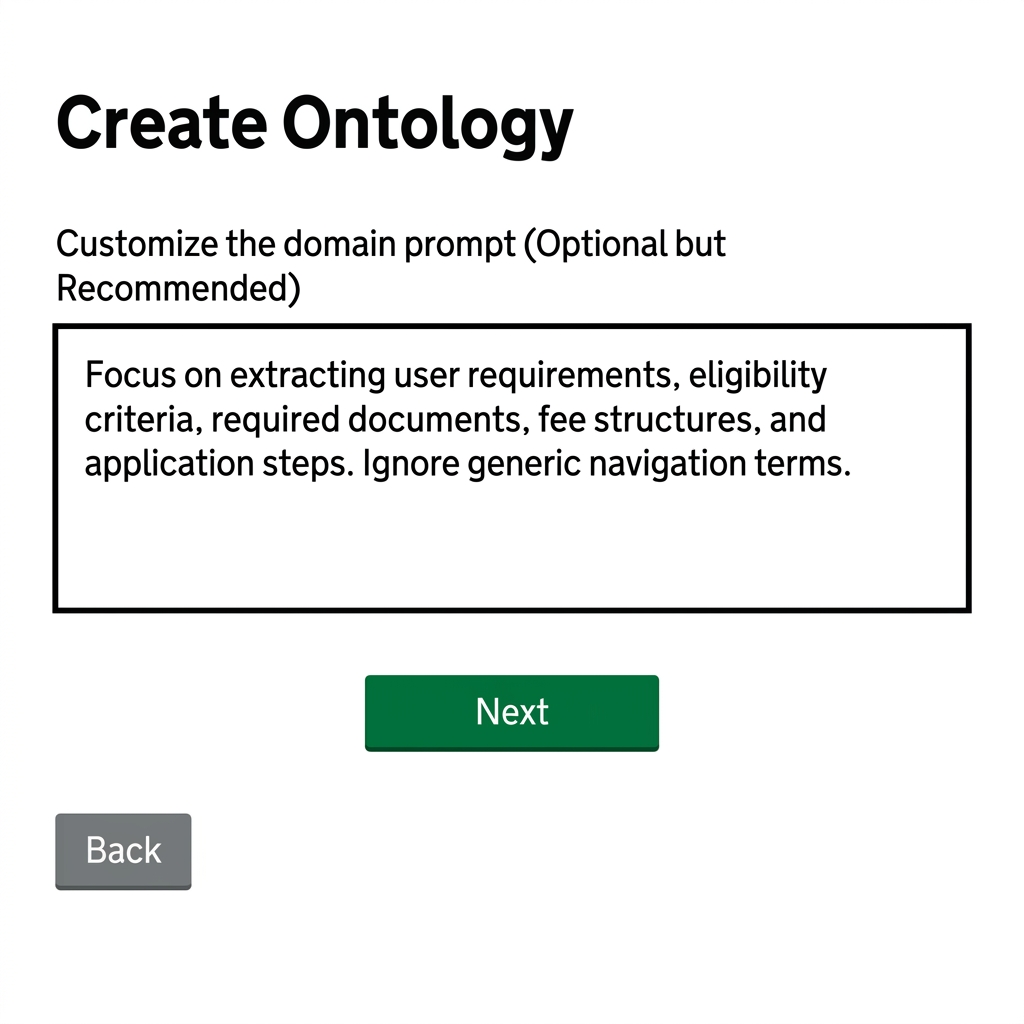
Step 3: Customize the Domain Prompt (Optional but Recommended)
The domain prompt guides the LLM on what type of information and concepts to extract.
- Enter your instructions directly into the Domain prompt text box in the user interface. For example:
"Focus on extracting user requirements, eligibility criteria, required documents, fee structures, and application steps. Ignore generic navigation terms."
- The prompt input is optional; if left blank, the generator uses built-in baseline prompts to create the ontology.
Step 4: Configure Advanced Settings (Optional)
By default, if you do not modify any of the parameters in this step, the generator uses the default configuration settings automatically. However, you can toggle the Advanced Parameters checkbox to customize settings if needed.
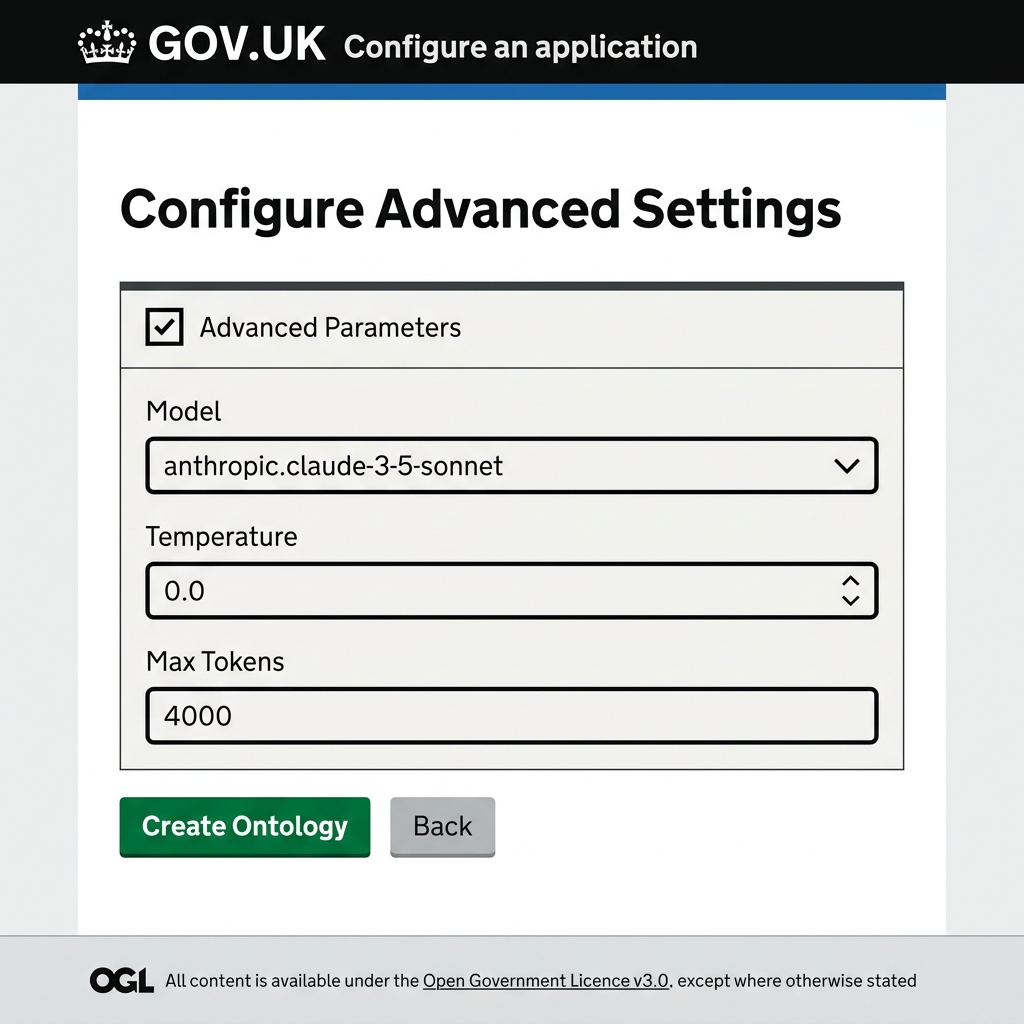
Below is the complete, parameter-by-parameter reference guide to all settings available in the configuration:
1. Large Language Model Settings (llm)
| Parameter | Type / Format | Default | Description / Purpose |
|---|---|---|---|
llm.model |
String | "bedrock:eu.anthropic.claude-sonnet-4-6" |
The target LLM. Supports Bedrock prefix (bedrock:) and models like Claude Sonnet. |
llm.temperature |
Float | 0.0 |
Controls AI randomness. Use 0.0 for predictable, deterministic extraction. |
llm.max_tokens |
Integer | 16000 |
Maximum token length for the model response. Higher values prevent text truncation. |
llm.aws_bedrock_enabled |
Boolean | true |
Toggles Bedrock API integration. |
llm.bedrock_enable_context_1m_beta |
Boolean | false |
Enables AWS Bedrock experimental 1M token context support. |
llm.bedrock_context_1m_beta_flag |
String | "context-1m-2025-08-07" |
Bedrock model flag for the beta context feature. |
llm.bedrock_read_timeout_seconds |
Integer | 600 |
Read timeout limit for Bedrock API calls. |
llm.extraction_prompt_file |
String / Null | null |
Custom path to an override system extraction prompt. |
llm.retries |
Integer | 3 |
Simple retry attempts count for API calls. |
llm.retry_strategy.enabled |
Boolean | true |
Enables exponential backoff retry handler for rate limits. |
llm.retry_strategy.strategy_type |
Choice | "exponential" |
Backoff mathematical strategy: "exponential", "linear", "constant". |
llm.retry_strategy.initial_delay |
Float | 1.0 |
Delay in seconds before initiating the first retry attempt. |
llm.retry_strategy.max_delay |
Float | 30.0 |
Maximum limit on delays between retries. |
llm.retry_strategy.backoff_multiplier |
Float | 2.0 |
The factor by which delay increases each retry. |
llm.retry_strategy.jitter |
Boolean | true |
Adds random time variance to avoid coordinated request spikes. |
llm.retry_strategy.retry_on_rate_limit |
Boolean | true |
Automatically retry on API 429 rate limit exceptions. |
llm.retry_strategy.retry_on_timeout |
Boolean | true |
Automatically retry on API connection timeout errors. |
llm.bedrock_quota_governor.enabled |
Boolean | true |
Active rate-limit governor guarding Bedrock client calls. |
llm.bedrock_quota_governor.requests_per_minute |
Integer | 7000 |
Threshold of maximum requests allowed per minute. |
llm.bedrock_quota_governor.tokens_per_minute |
Integer | 3500000 |
Threshold of maximum tokens allowed per minute. |
llm.bedrock_quota_governor.max_concurrency |
Integer | 10 |
Maximum parallel threads communicating with AWS Bedrock. |
llm.bedrock_quota_governor.window_seconds |
Integer | 60 |
Time window length for rate limitation tracking. |
llm.bedrock_quota_governor.jitter_min_seconds |
Float | 0.2 |
Minimum random delay factor. |
llm.bedrock_quota_governor.jitter_max_seconds |
Float | 1.5 |
Maximum random delay factor. |
2. Batching Settings (batching)
| Parameter | Type / Format | Default | Description / Purpose |
|---|---|---|---|
batching.chunks_per_batch |
Integer | 2 |
Number of text chunks processed in a single LLM request. |
batching.chunk_separator |
String | "\n\n---\n\n" |
Character boundary marking different chunks within a batch. |
batching.file_level_scaffold_enabled |
Boolean | true |
Generates a per-file summary first to guide chunk-level consistency. |
batching.input_token_ratio |
Float | 0.5 |
Fraction of context window reserved for input chunks. |
batching.max_batch_size_anthropic |
Integer | 4 |
Hard limit on chunks per batch for Anthropic models. |
batching.max_batch_text_length |
Integer / Null | null |
Safety limit on character count in a single batch. |
batching.max_input_tokens |
Integer | 32000 |
Safety limit to prevent prompt sizing from collapsing batch size. |
batching.min_batch_size |
Integer | 1 |
Lower bound on batch size. |
batching.min_batch_tokens |
Integer | 200 |
Lower bound on tokens allocated per batch. |
3. Checkpointing Settings (checkpointing)
| Parameter | Type / Format | Default | Description / Purpose |
|---|---|---|---|
checkpointing.enabled |
Boolean | true |
Enable state saving to resume jobs that fail mid-run. |
checkpointing.auto_resume |
Boolean | true |
Automatically pick up progress from an existing checkpoint. |
checkpointing.checkpoint_filename |
String | "processing_checkpoint.json" |
Saved progress filename. |
checkpointing.flush_interval_batches |
Integer | 100 |
Write to disk interval based on batch count. |
checkpointing.flush_timeout_seconds |
Integer | 600 |
Force flush checkpointer after time elapsed. |
checkpointing.max_state_checkpoints |
Integer | 3 |
Limit on history retention of checkpoints. |
checkpointing.persist_state |
Boolean | false |
Deep persistence of extraction state (opt-in). |
checkpointing.state_checkpoint_stages |
List | ['extraction', 'deduplication', 'schema'] |
Specific stages where status checkpoints are persisted. |
4. Conflict Resolution & Deduplication Settings (conflict_resolution, deduplication)
| Parameter | Type / Format | Default | Description / Purpose |
|---|---|---|---|
conflict_resolution.enabled |
Boolean | true |
Resolve properties conflict automatically. |
conflict_resolution.strategy |
Choice | "higher_confidence" |
Resolving rule: pick value with higher LLM confidence score. |
deduplication.conflict_resolution_strategy |
Choice | "confidence" |
Merge strategy: "confidence" or "latest". |
deduplication.enable_label_similarity_check |
Boolean | true |
Enforces lexical similarity on labels before allowing semantic merge. |
deduplication.exact_threshold |
Float | 1.0 |
Match score for string-identity based deduplication. |
deduplication.high_semantic_similarity |
Float | 0.985 |
Unconditional merge score for semantic vector distance. |
deduplication.min_label_similarity |
Float | 0.75 |
Required character/token overlap score before merging. |
deduplication.semantic_threshold |
Float | 0.88 |
General cosine similarity threshold for vector merges. |
deduplication.faiss.threshold |
Integer | 100 |
Entity count trigger to shift from array search to FAISS indexing. |
deduplication.faiss.batch_size |
Integer | 100 |
Search lookup batch size in FAISS. |
deduplication.faiss.index_type |
Choice | "auto" |
Index structure strategy. |
deduplication.faiss.rebuild_threshold |
Integer | 10000 |
Rebuild index after N insertions to maintain precision. |
deduplication.faiss.top_k |
Integer | 50 |
Nearest neighbors depth searched. |
5. Semantic Embeddings Settings (embeddings)
| Parameter | Type / Format | Default | Description / Purpose |
|---|---|---|---|
embeddings.model |
String | "bedrock:cohere.embed-multilingual-v3" |
Model used for semantic distance calculations. |
embeddings.dimension |
Integer | 1024 |
Cohere vector size. (Gemini: 3072, OpenAI Large: 1536). |
embeddings.batch_size |
Integer | 100 |
Text chunk array size dispatched for vector extraction. |
embeddings.max_batch_size |
Integer | 100 |
System safety batch cap to avoid request memory limits. |
embeddings.concurrency |
Integer | 10 |
Concurrency limit on embedding API workers. |
embeddings.task_type |
String | "SEMANTIC_SIMILARITY" |
Embedding downstream task flag. |
embeddings.cache.enabled |
Boolean | true |
Avoid recalculations by caching generated embeddings. |
embeddings.cache.directory |
String | "domains/.cache" |
Cache files storage destination folder. |
embeddings.cache.file |
String | "embeddings.json" |
Vector cache storage filename. |
6. Error Handling & Limits Settings (error_handling, limits)
| Parameter | Type / Format | Default | Description / Purpose |
|---|---|---|---|
error_handling.continue_on_error |
Boolean | true |
Continues processing on non-fatal chunk failures. |
error_handling.collect_severities |
List | ['error', 'warning', 'info'] |
Log details collected during execution. |
error_handling.max_errors |
Integer / Null | null |
Error count limit before halting pipeline. |
limits.max_entities |
Integer / Null | null |
Hard cap on total entities allowed. |
limits.max_entity_types |
Integer / Null | null |
Hard cap on total classes (Entity Types). |
limits.max_relationships |
Integer / Null | null |
Hard cap on total relationships allowed. |
limits.max_relationship_types |
Integer / Null | null |
Hard cap on unique relation properties. |
7. Filesystem & Storage Options (filesystem, output)
| Parameter | Type / Format | Default | Description / Purpose |
|---|---|---|---|
filesystem.protocol |
Choice | "s3" |
Storage interface: "s3", "local", "gcs". |
filesystem.options |
Map | {} |
Backend parameters (e.g. region keys). |
output.base_directory |
String | (Auto-resolved) | Run output files destination directory. |
output.append_domain_name |
Boolean | false |
Append domain subfolder suffix dynamically. |
output.compress_output |
Boolean | false |
Gzip output JSON files. |
output.pretty_print |
Boolean | false |
Human-readable pretty format for S3 outputs. |
output.include_metadata |
Boolean | true |
Include audit telemetry in output graphs. |
output.type_aware_canonical_keys |
Boolean | true |
Prefixes keys with types to block collision. |
output.graph_filename |
String | "graph.json" |
Network visualization target file. |
output.schema_filename |
String | "schema.json" |
Taxonomy mapping target file. |
output.export.enabled |
Boolean | true |
RDF translation activation flag. |
output.export.format |
Choice | "turtle" |
RDF encoding syntax ("turtle" or "rdfxml"). |
output.export.base_uri |
String | "http://example.org/ontology" |
Global RDF ontology target namespace. |
output.export.min_property_frequency |
Integer | 4 |
Ignore properties seen fewer than N times. |
8. Naming Conventions (naming_conventions)
| Parameter | Type / Format | Default | Description / Purpose |
|---|---|---|---|
naming_conventions.enabled |
Boolean | true |
Active normalization enforcement. |
naming_conventions.entity_type_casing |
Choice | "UpperCamelCase" |
Class casing (e.g. MedicalConcept). |
naming_conventions.property_casing |
Choice | "lowerCamelCase" |
Attribute casing (e.g. startDate). |
naming_conventions.relationship_type_casing |
Choice | "lowerCamelCase" |
Relationship type casing. |
naming_conventions.entity_label_spelling_variant |
Choice | "UK" |
Language mapping preference. |
naming_conventions.entity_iri_spelling_variant |
Choice | "US" |
Global identifier format. |
9. Relationship Processing (relationship_processing)
| Parameter | Type / Format | Default | Description / Purpose |
|---|---|---|---|
relationship_processing.auto_create_missing_entities |
Boolean | true |
Automatically create missing nodes to avoid losing relations. |
relationship_processing.auto_created_entity_confidence |
Float | 0.5 |
Lower confidence factor assigned to implied nodes. |
relationship_processing.auto_created_entity_default_type |
String | "entity" |
Default class type for implied nodes. |
10. Web Research Settings (research)
| Parameter | Type / Format | Default | Description / Purpose |
|---|---|---|---|
research.max_fetches |
Integer | 50 |
Maximum pages gathered during exploration. |
research.allowed_domains |
List | [] |
Limit lookup to specific domain patterns. |
research.blocked_domains |
List | [] |
Blacklist specific sites. |
research.num_queries |
Integer | 5 |
Generated LLM queries count. |
research.results_per_query |
Integer | 10 |
Results returned from search engine per query. |
research.http_timeout |
Float | 30.0 |
Maximum wait for web response. |
11. Schema Evolution Settings (schema_evolution)
| Parameter | Type / Format | Default | Description / Purpose |
|---|---|---|---|
schema_evolution.type_similarity_threshold |
Float | 0.75 |
Distance score allowed before merging classes. |
schema_evolution.default_entity_type |
String | "entity" |
Fallback type when missing. |
schema_evolution.initial_version |
String | "1.0" |
Baseline version. |
schema_evolution.version_increment |
Choice | "patch" |
Version progression: "major", "minor", "patch". |
12. Source Grounding Settings (source_grounding)
| Parameter | Type / Format | Default | Description / Purpose |
|---|---|---|---|
source_grounding.enabled |
Boolean | true |
Maps data points back to source files. |
source_grounding.source_property_name |
String | "sourceUrls" |
Metadata key holding origin paths. |
source_grounding.merge_sources_on_deduplication |
Boolean | true |
Combines sources when merging duplicate terms. |
13. Text Processing Settings (text_processing)
| Parameter | Type / Format | Default | Description / Purpose |
|---|---|---|---|
text_processing.chunking.chunk_size |
Integer | 2500 |
Size in characters of chunks. |
text_processing.chunking.chunk_overlap |
Integer | 250 |
Character overlap. |
text_processing.chunking.min_chunk_size |
Integer | 100 |
Rejects tiny fragment chunks. |
text_processing.normalization.casing |
Choice | "lowercase" |
Target normalization casing. |
text_processing.normalization.punctuation_handling |
Choice | "remove" |
Casing/punctuation handler strategy. |
14. Performance & Feature Flags (performance, features)
| Parameter | Type / Format | Default | Description / Purpose |
|---|---|---|---|
performance.llm_cache_enabled |
Boolean | true |
Cache LLM text generation calls locally. |
performance.embedding_cache_enabled |
Boolean | true |
Cache embedding calculation responses. |
performance.max_cache_size_mb |
Integer | 500 |
Storage cache memory cap. |
features.schema_evolution |
Boolean | true |
Allow taxonomy discovery. |
features.incremental_updates |
Boolean | true |
Runs comparison on existing artifacts. |
features.conflict_resolution |
Boolean | true |
Resolve conflicts during merges. |
features.cross_session_deduplication |
Boolean | true |
Deduplicates terms across previous jobs. |
parallel_files |
Integer | 1 |
Number of files processed in parallel. |
batch_api_enabled |
Boolean | false |
Enable batch LLM request API. |
term_extraction.enabled |
Boolean | false |
Enable intermediate terminology phase. |
upper_ontology_enabled |
Boolean | true |
Enforces structural hierarchy consistency. |
Step 5: Submit the Generation Job
Click the green Create Ontology button at the bottom of the page.
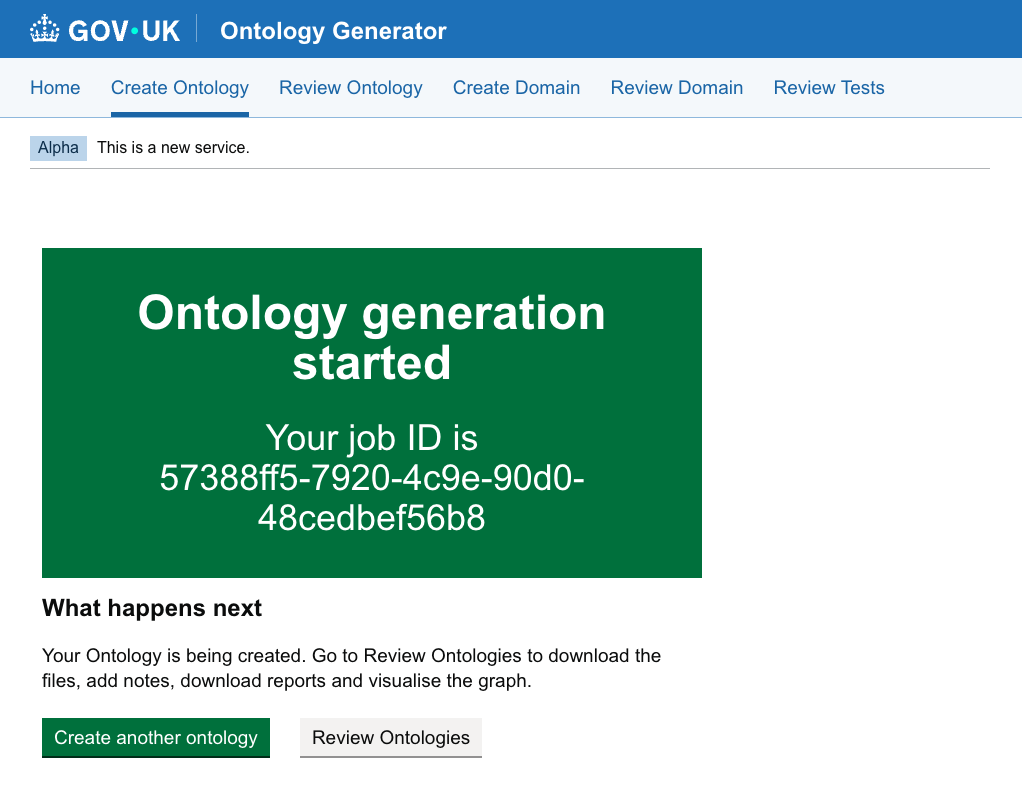
- Once submitted, you will receive a Job ID and a confirmation screen.
Monitoring and Reviewing Generated Ontologies
Step 1: Open the Jobs Dashboard
Go to Review Ontology: Link: https://govuk-ai-accelerator-app.integration.publishing.service.gov.uk/ontology/jobs/review
Step 2: View Your Job
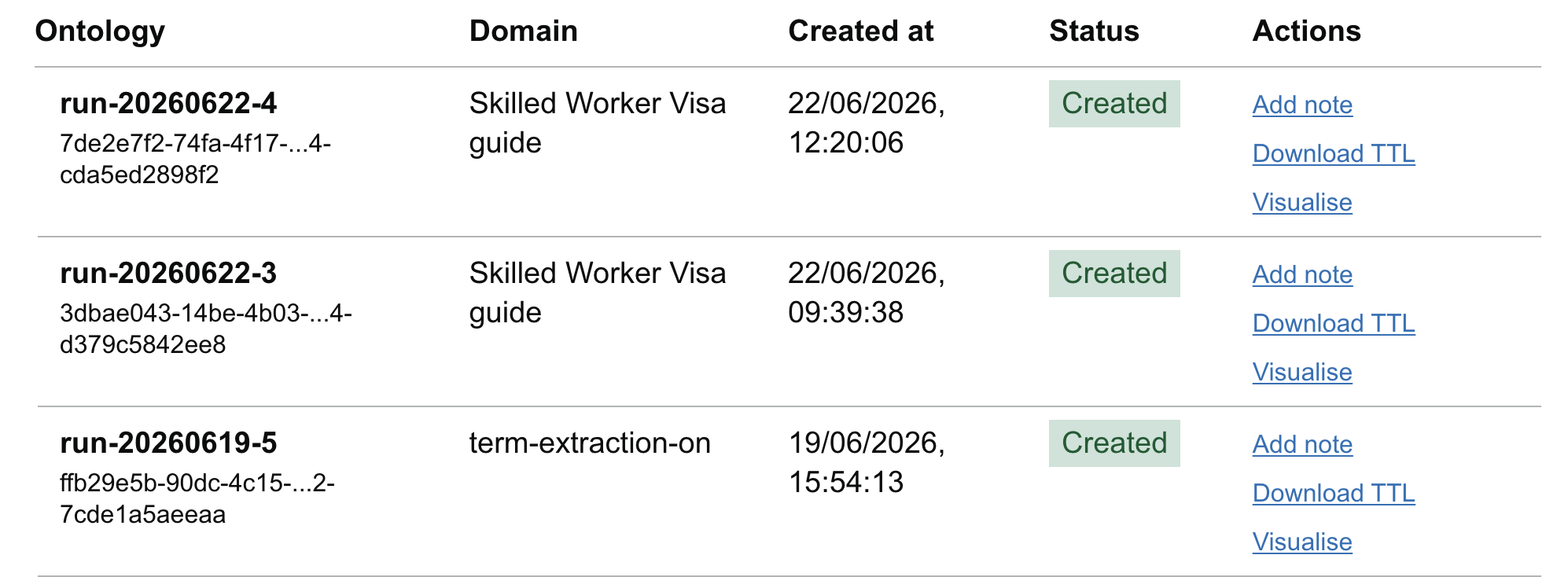
Look for your domain name and Job ID in the dashboard. Jobs progress through the following statuses:
- ⏳ Pending: The job is queued and waiting for an available background worker.
- ⚙️ Running: The worker is processing your domain pages (chunking, calling the LLM, deduplicating).
- ✅ Completed: The ontology was successfully generated and saved.
- 🛑 Stopped: The job was manually terminated by a user.
- ❌ Failed: An error occurred (e.g., LLM rate limits or incorrect configuration).
Step 3: Access Generated Artifacts
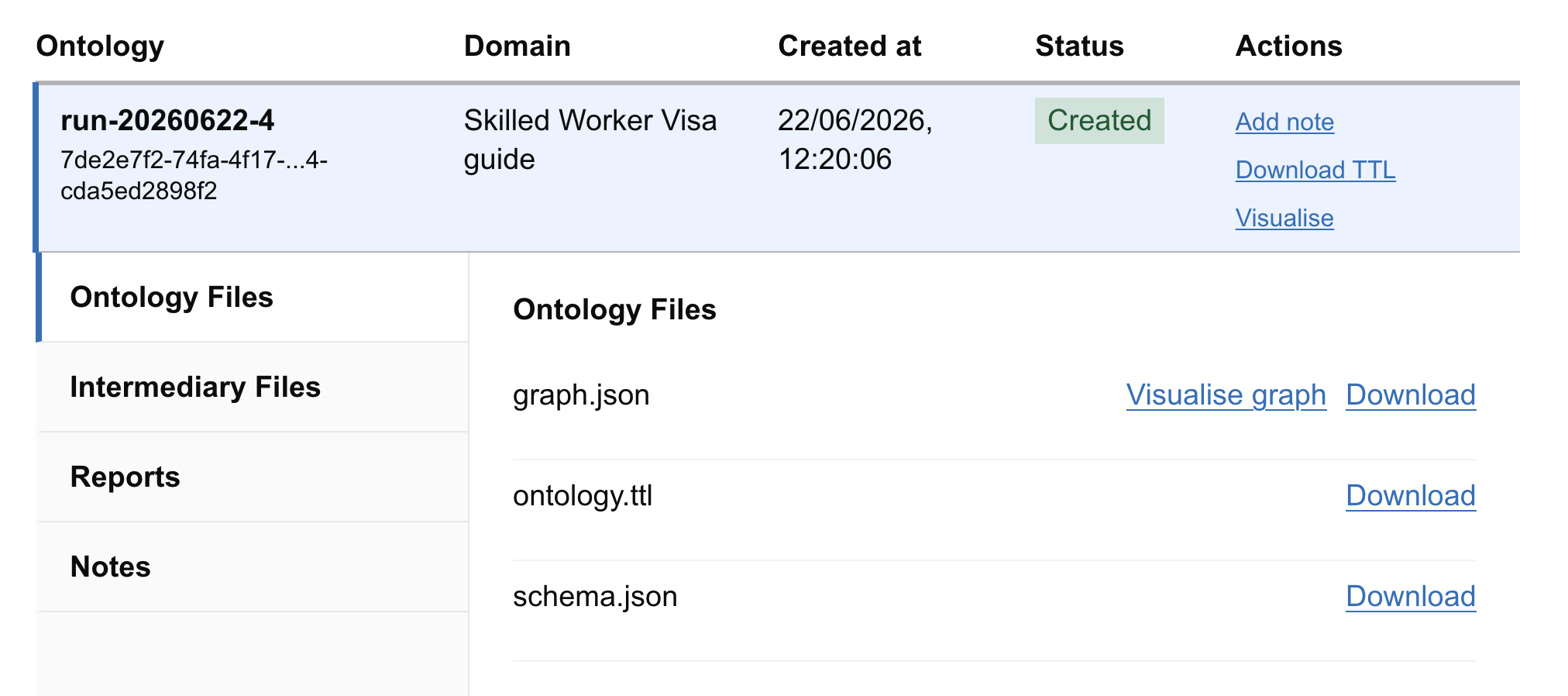
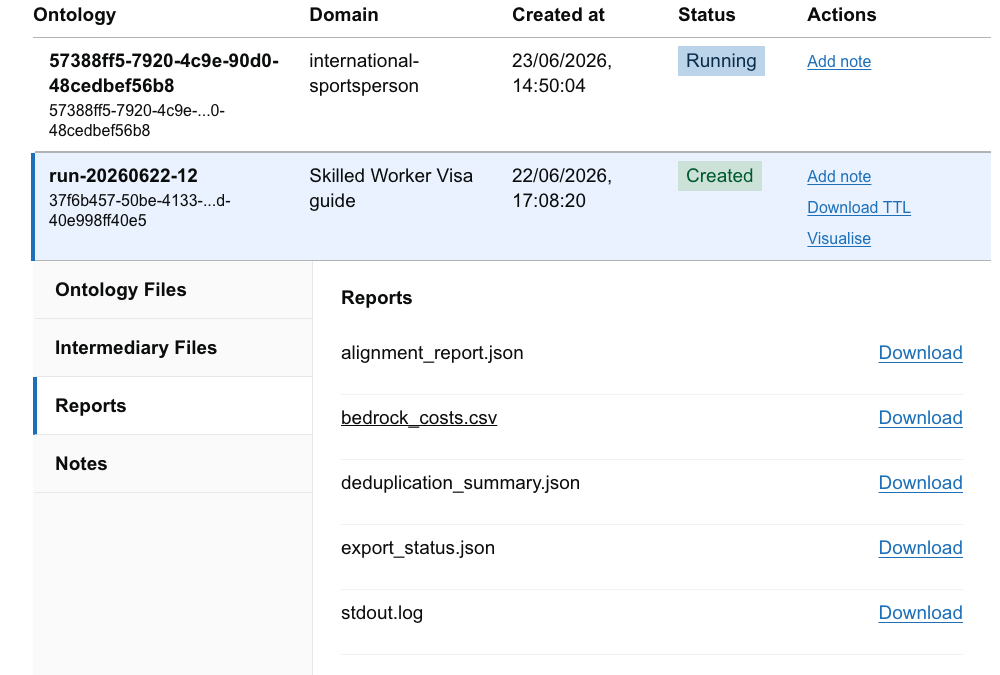
Click on a completed job to expand its details and download the output files:
| Artifact Name | Description | Recommended Action |
|---|---|---|
| ontology.ttl | The raw ontology file formatted in standard RDF Turtle syntax. | Download to import into external ontology editors (e.g., Protégé). |
| graph.json | Visual representation of the ontology network. | Used by the interactive visualizer. |
| schema.json | Summarizes the classes, properties, and relationship types discovered. | Quick text review of the ontology structure. |
| stdout.log | Detailed runtime logs for debugging. | Send to developers if the job fails. |
| bedrock_costs.csv | Approximate API costs incurred by the LLM during this run. | Review for budgeting and scaling analysis. |
Step 4: Visualize Your Ontology
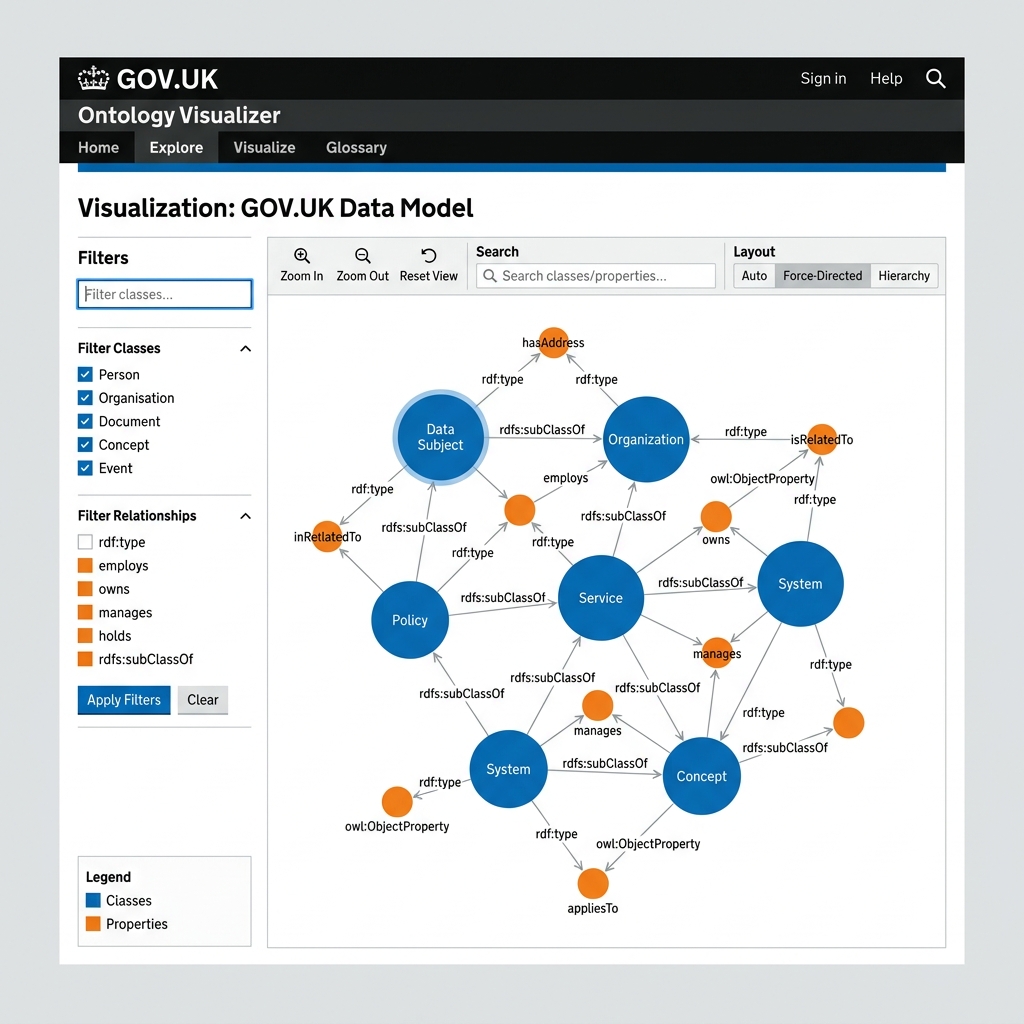
For any completed job, click the Visualize Ontology link. This opens the interactive visualizer, allowing you to search nodes, filter relationship types, and inspect the structure of your generated ontology.
Step 5: Job Notes and Collaboration
You can add annotations, comments, or review notes directly to a job:
- Click Add Note under the job details panel.
- Enter your observations (e.g., "The model extracted visa classes correctly but missed some minor sub-relationships").
- Click Save Note. These notes are saved to the database and can be viewed by all team members.
Part 2: Technical & Developer Reference
This section is for software developers and infrastructure engineers maintaining the ontology pipeline.
Technical Architecture
The ontology generation pipeline utilizes an asynchronous task queue managed within the web app and executed via background worker threads:
flowchart TD
    A[User Form: Select Domain & Prompt] --> B[POST /ontology/submit]
    B --> C[Validate JSON/YAML Config & Insert Job into DB]
    C --> D[Task Manager claims 'pending' job via Advisory Lock]
    D --> E[Spawn ThreadExecutor: run_ontology_background_task]
    E --> F[Load domain configs & init S3 Workspace]
    F --> G[Text Chunking & Batching]
    G --> H[LLM Extraction of Entities & Relationships]
    H --> I[Deduplication: Exact Hash & Semantic Embeddings]
    I --> J[Validate & Export to Turtle RDF / graph.json]
    J --> K[Upload Artifacts to S3 run-YYYYMMDD-HHMMSS/folder]
    K --> L[Update PostgreSQL job status to 'completed' or 'failed']
Key files involved in this pipeline:
-
Web Interface: govuk_ai_accelerator_app.py handles HTTP requests and manages database records for
ProcessingJob. - Pipeline Orchestrator: scripts/pipeline/ontology_generator.py defines the asynchronous processing steps and finalizes results.
- Task Worker Queue: scripts/pipeline/task_manager.py leases pending jobs, runs them concurrently, and manages leases/timeouts.
- Config Management: scripts/pipeline/utils.py parses parameters and maps domain properties.
Integration Libraries
-
boto3: The pipeline interfaces directly with AWS Bedrock APIs for text generation (e.g. Anthropic Claude models) and embedding calculations (e.g. Cohere Multilingual Embeddings). -
fsspec: Handles unified storage protocols. Based on the domain configuration (likefilesystem.protocol),fsspecabstracts all input/output reads and writes to local directories or AWS S3 buckets seamlessly.
Detailed Pipeline Execution Stages
When run_ontology_background_task is executed, it invokes the following workflow stages:
-
Setup Pipeline (
setup_pipeline):- Resolves input paths (usually pointing to
s3://<bucket>/<domain>/input/). - Resolves output directory (usually
s3://<bucket>/<domain>/run-<datetime>/). - If
incremental: trueis set, loads existing ontology artifacts from S3 so new extractions can build upon them.
- Resolves input paths (usually pointing to
-
Extraction Stage (
_extract_ontology):- Chunking: Parses input markdown files into text chunks based on the configured token size (default: 4000 tokens) and overlap (default: 100 tokens).
- Batching: Groups multiple chunks together to optimize LLM call throughput and minimize API latency.
- LLM Calls: Invokes the Bedrock or Anthropic API to perform structured zero-shot / few-shot entity and relationship extraction.
-
Processing Stage (
_process_ontology):-
Deduplication: Merges identical entities using a two-stage method:
- Exact: Hash-based exact string matching on entity labels.
-
Semantic: Generates embeddings (default:
bedrock:cohere.embed-multilingual-v3) and uses cosine similarity / FAISS to merge synonyms and spelling variants.
- Relation Building: Links entities using extracted properties.
- Schema Evolution: Automatically identifies and merges newly discovered entity types or relationship patterns into the global schema definitions.
-
Deduplication: Merges identical entities using a two-stage method:
-
Graph Exporter (
_create_ontology_graph):- Converts extracted data structures into standard RDF graph representations.
- Exports the graph into:
-
ontology.ttl(Turtle RDF/OWL ontology). -
graph.json(Network graph for visualization). -
schema.json(Taxonomy / schema overview).
-
-
Finalize Stage (
_save_pipeline_output):- Uploads files and cost/performance logs (
bedrock_costs.csv,owl_ontology_metrics.csv) to S3. - Saves a copy of the configuration (
config.yaml) and system prompts (prompts.txt) to the output path.
- Uploads files and cost/performance logs (
Storage Directory Layout (S3)
Outputs from ontology runs are written under the domain name with unique timestamped directories. No intermediate chunk/embedding database files or archives are saved to S3:
s3://<bucket_name>/<domain_name>/
├── input/
│   ├── <slug>.md
│   └── sources.json
├── run-YYYYMMDD-HHMMSS/              # Single run workspace
│   ├── config.yaml                   # The exact configuration used
│   ├── prompts.txt                   # Prompt instructions used
│   ├── stdout.log                    # Run logs
│   └── output/                       # Output files
│       ├── ontology.ttl              # Turtle RDF ontology
│       ├── graph.json                # Network graph JSON
│       ├── schema.json               # Schema JSON
│       ├── bedrock_costs.csv         # Cost metrics
│       ├── owl_ontology_metrics.csv  # Node/Edge counts
│       └── deduplication_summary.json
Task Manager, Database Queue, & Configuration
The background execution queue relies on PostgreSQL transactions and metadata tables for job synchronization.
Database Schema Structure
1. ProcessingJob
Stores the configuration, logs, and current status of all ingestion and ontology generation jobs:
-
id(String, Primary Key): Unique job ID (UUID). -
status(String): Status of the job (pending,running,completed,stopped,failed). -
pipeline(String): The type of execution pipeline (ingestion,ontology, orontology-harness). -
domain(String): The domain name (e.g.housing). -
config_data(Text): JSON string representation of the config dictionary. -
domain_prompt(Text): The custom prompt guidelines typed by the user. -
attempt_count(Integer): Number of execution attempts. -
claimed_by(String): Hostname of the worker pod currently running the job. -
claimed_at(DateTime) &heartbeat_at(DateTime): Lease tracking timestamps.
2. ProcessingJobNote
Stores annotations added by team members to individual jobs:
-
id(Integer, Primary Key): Auto-increment note ID. -
job_id(String, Foreign Key): Links toProcessingJob.id. -
text(Text): The note content. -
created_at(DateTime) &updated_at(DateTime): Timestamps for note creation.
Task Management Mechanisms
To prevent duplicate processing in scaled/containerized environments, the application uses PostgreSQL Advisory Locks for leader election:
-
Leader Election: The task manager thread calls
SELECT pg_try_advisory_lock(420021)to ensure only one pod processes queue maintenance operations (like job cleanup and requeuing). -
Lease Claiming: Workers claim jobs using a database transaction with
SELECT ... FOR UPDATE SKIP LOCKEDon theProcessingJobtable. This updates job state torunningand signs theclaimed_bycolumn with the hostname. -
Heartbeat & Recovery: If a worker crashes, the job remains in
running. The leader checks jobs running longer thanPROGRESS_TIMEOUT_MINUTES(default: 45) and requeues them up toMAX_JOB_ATTEMPTS(default: 2) before marking them as failed.
Environment Variable Settings
The following variables govern the queue:
-
PROGRESS_TIMEOUT_MINUTES(default:45): The timeframe after which a running job with no progress updates is considered stale. -
MAX_JOB_ATTEMPTS(default:2): The limit of requeue attempts for failed/stale tasks. -
S3_BUCKET_NAME(default:govuk-ai-accelerator-data-integration): The destination bucket for pipeline read/write.
Local Development & CLI Usage
Running the Pipeline locally
Developers can run a local task worker that listens to the database and processes queued ontology generation jobs:
# 1. Export AWS credentials for Bedrock and S3 access
export AWS_ACCESS_KEY_ID="your-key"
export AWS_SECRET_ACCESS_KEY="your-secret"
export S3_BUCKET_NAME="govuk-ai-accelerator-data-integration"

# 2. Boot the Flask app (which starts the task manager thread automatically)
source environment.sh
uv run govuk_ai_accelerator_app.py
Triggering Ingestion & Ontology Scripting
To trigger an ontology run directly from Python without spawning the Flask UI:
uv run python -c "
import asyncio
from scripts.pipeline.ontology_generator import run_ontology_pipeline

config_override = {
    'domain_name': 'tenancy-rules',
    'path': {
        'input_path': 's3://govuk-ai-accelerator-data-integration/tenancy-rules/input',
        'output_dir': 's3://govuk-ai-accelerator-data-integration/tenancy-rules/manual-run'
    }
}

async def main():
    path = await run_ontology_pipeline(
        config_data=config_override,
        domain_prompt='Focus on landlord and tenant obligations.'
    )
    print(f'Ontology saved to: {path}')

asyncio.run(main())
"