govuk-ai-accelerator: Runbook: Domain Creation and Ingestion
This guide is split into two sections:
- User Guide (Non-Technical) - For Information Architects, Content Designers, and anyone using the web interface.
- Technical & Developer Reference - For software developers and engineers maintaining the application.
Part 1: User Guide (Non-Technical)
What is this tool?
Before pages can be processed, they need to be downloaded from GOV.UK and cleaned. This tool does two things:
-
Domain Creation: Groups a list of GOV.UK pages together under a single topic name (a "domain", such as
housingorvisa-guidance). - Ingestion: Automatically visits each link, strips out web page noise (like navigation headers, footer links, and print buttons), converts the core text into clean Markdown format, and stores it in the cloud.
How to Create a Domain & Ingest Pages (UI Workflow)
Follow these steps to download and clean GOV.UK pages for a new domain:
Step 1: Open the Application
Navigate to the deployed application in your web browser: Link: https://govuk-ai-accelerator-app.integration.publishing.service.gov.uk/ontology/domains
Step 2: Name Your Domain
- On the Create an Ontology Domain wizard page, click the green Start button.
- Under Provide the name of your domain, type a short, descriptive name using lowercase letters and hyphens (e.g.,
driving-licences,apprenticeships,tenancy-rules).[!IMPORTANT] Please avoid adding spaces in the name of the domain.
- Click the Next button.
Step 3: Paste Your GOV.UK Links
-
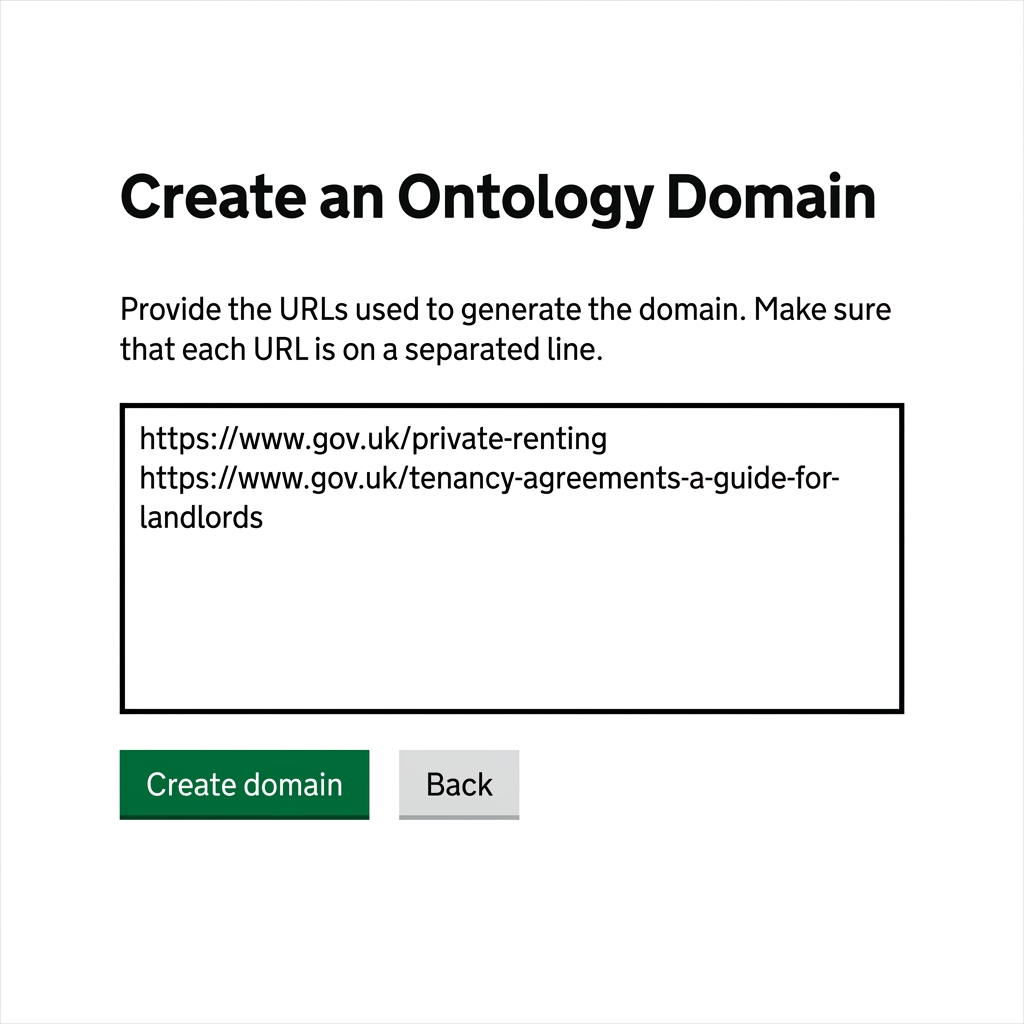
Paste the list of GOV.UK links you want to ingest into the text box.
-
Follow these Crucial Formatting Guidelines:
- One link per line: Enter exactly one URL on each line.
-
No trailing punctuation: Do not add commas (
,), colons (:), semicolons (;), or other symbols at the end of the links. - No text labels: Do not include descriptive labels, titles, or comments next to the links.
-
Complete URLs starting with
https://only: Every link must start withhttps://. Links starting withwww.(missinghttps://) will be skipped.
Correct Input Example:
https://www.gov.uk/private-renting
https://report-error-evisa.homeoffice.gov.uk/guidance
Incorrect Input Example:
www.gov.uk/private-renting (Missing https:// - will be skipped) https://www.gov.uk/private-renting, (Trailing comma - will fail) https://www.gov.uk/visa-fees; (Trailing semicolon - will fail) /visa-fees (Relative path - will be skipped) -
Click the Create domain button.
Step 4: Monitor Ingestion Progress
-
Once submitted, you will see a confirmation box displaying a Job ID.
-
Click the Review Domain button.
-
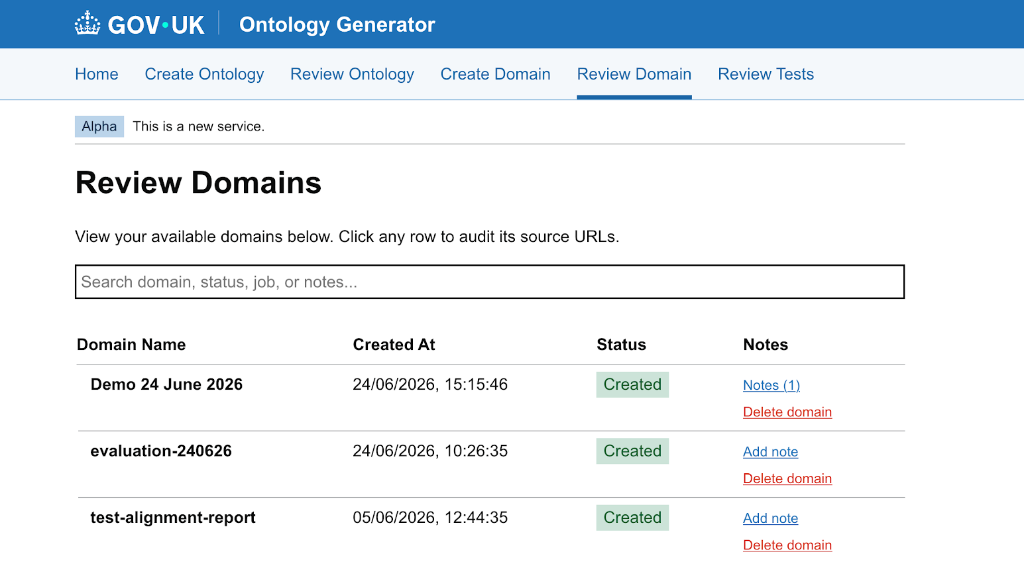
This opens the dashboard showing all active domains. Look for your domain in the list:
- ⏳ Pending / Running: The tool is currently visiting the websites and downloading the content.
- ✅ Completed: All pages were successfully downloaded, cleaned, and stored in the cloud.
- ❌ Failed: Something went wrong (e.g., no valid links were provided).
Troubleshooting for Non-Technical Users
If your domain ingestion run fails or skips some pages, toggle the sections below to find resolutions:
Ensure all URLs begin with https://. URLs starting directly with www. will be skipped because the system cannot recognise them without the security protocol.
Verify there are no commas, colons, or trailing spaces in the URL text box. Even a single trailing comma can cause a URL to fail to load.
The link must belong to a domain ending in .gov.uk (for example, standard pages like https://www.gov.uk/... or subdomains like https://report-error-evisa.homeoffice.gov.uk/...). Non-government links will be skipped.
Avoid pasting print-only pages (e.g., links ending with /print). The tool will strip print options automatically, so paste the standard user-facing web links instead.
If a page has no text content (for example, if it only contains images or is a landing page with nothing but navigation links), the tool will skip it since there is no text to download.
Part 2: Technical & Developer Reference
This section is for developers maintaining the application infrastructure.
Technical Architecture
The ingestion and domain creation flow uses an API-First, asynchronous task architecture:
-
Web Endpoint:
POST /ontology/ingestin govuk_ai_accelerator_app.py handles domain creation requests. -
Config Management: Managed by the
IngestionConfigdataclass in scripts/ingestion/commands/utils.py. -
Background Orchestration: Managed asynchronously via a Python thread executor invoking
run_ingestion_background_taskin scripts/ingestion/ingestion_pipeline.py. -
Storage Layer (S3): Deployed runs use
fsspecconnected to AWS S3. The default target S3 bucket isgovuk-ai-accelerator-data-integration(or configured via environment variableS3_BUCKET_NAME). - Database Tracking: Job statuses, configurations, error logs, and user notes are persisted in a deployed PostgreSQL database.
HTTP API Documentation
You can trigger ingestion programmatically by making a POST request to the integration environment API.
Submit Ingestion Request
-
Endpoint:
POST https://govuk-ai-accelerator-app.integration.publishing.service.gov.uk/ontology/ingest -
Headers:
Content-Type: application/json -
JSON Payload:
{
  "domain": "housing",
  "links": [
    "https://www.gov.uk/private-renting",
    "https://www.gov.uk/tenancy-agreements-a-guide-for-landlords"
  ]
}
Example curl request:
curl -X POST https://govuk-ai-accelerator-app.integration.publishing.service.gov.uk/ontology/ingest \
  -H "Content-Type: application/json" \
  -d '{
    "domain": "housing",
    "links": [
      "https://www.gov.uk/private-renting",
      "https://www.gov.uk/tenancy-agreements-a-guide-for-landlords"
    ]
  }'
Check Ingestion Status
-
Endpoint:
GET https://govuk-ai-accelerator-app.integration.publishing.service.gov.uk/ontology/ingest/status/<job_id>
Example curl request:
curl https://govuk-ai-accelerator-app.integration.publishing.service.gov.uk/ontology/ingest/status/c1a6b0c2-51bc-4e59-a29d-649079f82de3
Storage Directory Layout (S3)
Every domain represents a logical workspace:
s3://<bucket_name>/<domain_name>/
├── input/
│   ├── <slug-1>.md
│   ├── <slug-2>.md
│   └── sources.json             # Map of S3 file paths to original source URLs
├── html_content/                # (Optional) Staged raw HTML files
└── ingestion_YYYYMMDD_HHMMSS.log # Consolidated execution log
Execution Logic and Pipeline Stages
When a background ingestion job is running, it executes the following steps:
-
Load Configuration (
load_config): Config parameters are merged with default settings derived from the domain name. S3 paths are mapped foroutput_dir,html_dir, andlog_path. -
Download Content (
download_content):- Core content is parsed and extracted using
BeautifulSouptargeting elements matching IDs#guide-contents,#contentor#main-content. - Noise elements (
script,style,nav,aside, etc.) are decomposed. - HTML is converted to Markdown via
markdownifyand saved to S3. - A mapping of outputs to source URLs is written to S3 at
s3://<bucket>/<domain>/input/sources.json.
- Core content is parsed and extracted using
-
Clean Content (
clean_content):- Trims whitespace and removes printable references like Print this page or Printable version.
- Overwrites files with cleaned content.
Infrastructure Troubleshooting
1. Database Connection Failures
-
Symptom: App log shows
Database unavailable, proceeding without job tracking. -
Resolution: Check that the PostgreSQL instance is running and that the
DATABASE_URLenvironment variable is correctly set up and accessible in the hosting environment.
2. S3 Bucket Permissions
- Symptom: Ingestion job fails with S3 access or credential errors.
- Resolution: Verify IAM policies. The hosting container role (ECS task role, EKS ServiceAccount, etc.) must have read/write access permissions for the target S3 bucket.
Appendix: Local Development & Scripting
For developers working locally:
1. Local Setup & Boot
Ensure Postgres is running, export AWS environment credentials, and start the local Flask app:
# 1. Start database
make db-start

# 2. Start local web server (runs on http://localhost:3000)
source environment.sh
uv run govuk_ai_accelerator_app.py
[!NOTE] Background worker threads execute in-process via
ThreadPoolExecutor, so no celery/redis configuration is needed locally.
2. Local CLI Ingestion Trigger
To run ingestion programmatically from the local terminal without the web UI:
uv run python -c "
from scripts.ingestion.ingestion_pipeline import run_ingestion_background_task
run_ingestion_background_task(
    domain='travel-advice',
    links_list=['https://www.gov.uk/foreign-travel-advice/france', 'https://www.gov.uk/foreign-travel-advice/spain']
)
"