Disable and re-enable the app promo banner
The app promo banner is a component (https://components.publishing.service.gov.uk/component-guide/app_promo_banner) that appears only on certain GOV.UK pages, and only for Android users.
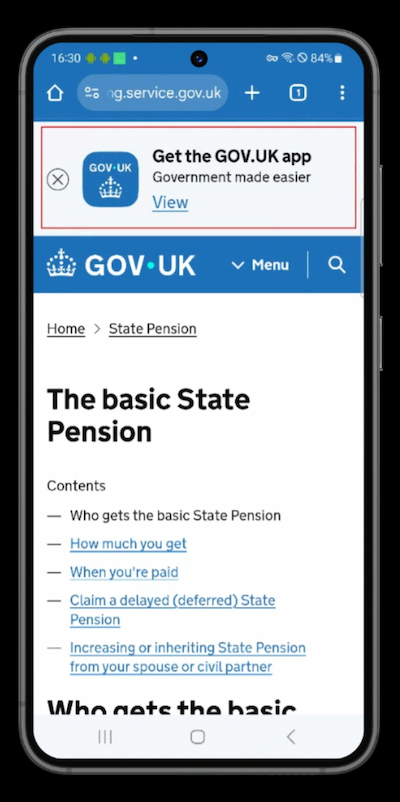
It is used to promote the GOV.UK app and drive users to its download page on the Google Play Store: https://play.google.com/store/apps/details?id=uk.gov.govuk&hl=en_GB.
Disable the banner
To disable the banner, either remove or set to false the show_app_promo_banner setting in the public layout component.
<%= render "govuk_publishing_components/components/layout_for_public", {
    draft_watermark: draft_host?,
    title: page_title,
    title_lang: I18n.locale,
    emergency_banner: render("govuk_web_banners/emergency_banner"),
    global_banner: render("govuk_web_banners/global_banner"),
-   show_app_promo_banner: show_app_promo_banner?,
  } do %>
Re-enable the Banner
To re-enable the banner, ensure the show_app_promo_banner setting is included and set to the show_app_promo_banner? method, which determines on which page paths the banner should appear.
<%= render "govuk_publishing_components/components/layout_for_public", {
    draft_watermark: draft_host?,
    title: page_title,
    title_lang: I18n.locale,
    emergency_banner: render("govuk_web_banners/emergency_banner"),
    global_banner: render("govuk_web_banners/global_banner"),
+   show_app_promo_banner: show_app_promo_banner?,
  } do %>
More information
For details on when and how the app promo banner was added, see https://github.com/alphagov/frontend/pull/5233 and https://github.com/alphagov/collections/pull/4354.